


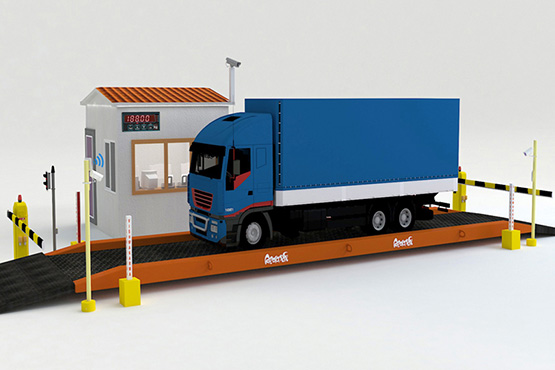

A weighbridge automation system turns a single platform into a controlled lane. Sensors detect the truck, signals and barriers guide it, RFID and cameras identify it and one controller records the weight. This article explains the parts of the lane and where each one goes, so weighbridge lane automation is easier to plan.
Key takeaways
- Weighbridge lane automation combines sensors, signals, barriers, RFID, a camera and a central controller.
- Entry and exit barriers keep one truck on the platform at a time.
- Position sensors and signals tell the driver when to stop and when to move.
- A weight is taken only when the truck is correctly placed and the reading is stable.
The lane around the platform
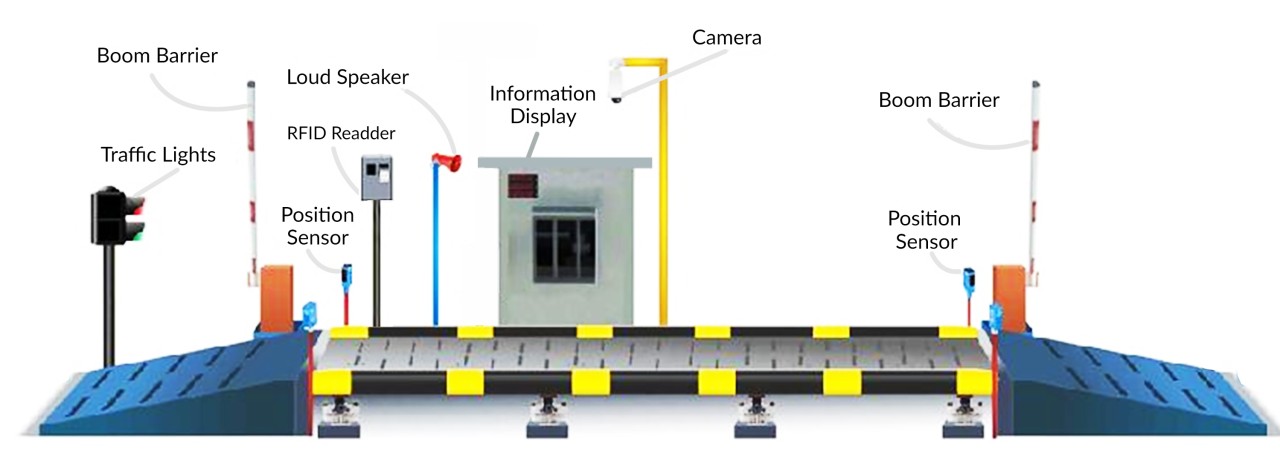
The platform sits in the middle, with an entry and exit ramp on each side. Around it are traffic lights, boom barriers, position sensors, a display, a speaker, an RFID reader and a camera. A cabin or control box holds the indicator and computer. The arrangement below shows the layout.
What each device does
Each device has one clear job, which keeps the sequence predictable.
| Device | Job in the lane |
|---|---|
| Entry boom barrier | Lets one truck onto the platform at a time |
| Position sensors | Check the truck is fully on the platform |
| Traffic lights and display | Tell the driver to stop, wait or go |
| RFID reader | Identifies the vehicle or the driver card |
| Camera | Records the plate and the truck |
| Exit boom barrier | Opens after the weight is stored |
| Central controller | Runs the sequence and sends data to the system |
The weighing sequence
The sequence is simple, and the controller makes sure no step is skipped.
- The truck approaches and the entry sensor detects it.
- The RFID and camera identify the vehicle.
- The barrier and signal let the truck onto the platform.
- Position sensors confirm the truck is fully on and the weight is stable.
- The weight is stored and the ticket is issued.
- The exit signal and barrier release the truck.
See how an unmanned weighbridge system works, step by step for the full explanation, and truck positioning on weighbridges for sensors and lights.
Planning and maintenance
Plan cable paths, power and lightning protection before installation. Make sure the lane has enough space for a truck to stop in line with the platform. After installation, test sensors and barriers regularly. See unmanned weighbridge components for the full parts list and redundancy when devices fail for fallback.
Weighbridge automation from Suraj Informatics
Suraj Informatics designs and installs unmanned weighbridge systems with lane controls, RFID, cameras and ERP integration, and supports existing weighbridges with upgrades.
Calibration note: automation does not replace legal metrology. The weighbridge, load cells and indicator must still be calibrated, stamped and verified at the intervals required by the Legal Metrology authorities, and after any repair or relocation.
Weighbridge lane automation: common questions
What is a weighbridge automation system?
A set of sensors, signals, barriers, identification and software that runs the weighing sequence without an operator for each truck.
Do I need two barriers?
Many lanes use an entry and an exit barrier so one truck is on the platform at a time and the weight is not disturbed.
What stops a truck being weighed in the wrong position?
Position sensors and signals check placement and the controller waits for a stable reading.
Does automation affect calibration?
No. The weighing equipment still needs regular calibration and verification.
Talk to our weighbridge team
Tell us about your weighbridge and vehicle types, and we will suggest the right sensors and guidance devices.





