




Mobile computing means using a portable device and a wireless connection to work with data away from a desk. In business, that could be a warehouse picker with a handheld scanner, a field engineer with a tablet or a driver with a phone. This guide explains the parts and how to keep them running well.
Key takeaways
- Mobile computing has three parts: the device, the wireless connection and the software.
- Work devices range from phones and tablets to rugged handhelds and vehicle computers.
- Apps should keep working, or save data, when the signal is weak.
- Device management and security are as important as the hardware.
The three parts of mobile computing
| Part | Role |
|---|---|
| Mobile device | The phone, tablet or handheld the person carries |
| Wireless connection | Wi-Fi or cellular links to servers and business systems |
| Software and apps | The programs that capture, show and send data |
Devices people carry for work
Consumer phones and tablets suit office and light field use. Where devices face drops, dust, rain or long shifts, rugged handhelds are built for the job, often with a built-in barcode scanner and a physical keypad or trigger. Vehicle-mounted computers serve forklifts and trucks.
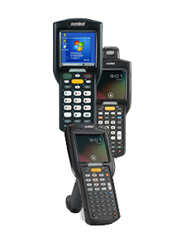
For examples and uses, see mobile computing solutions: rugged handhelds, tablets and vehicle PCs.
Connectivity and working offline
A device is only as useful as its connection. Inside a site, a well-designed Wi-Fi network lets devices move between access points without dropping their session. Outside, they rely on cellular data. Because coverage is never perfect, good business apps store entries on the device and send them when the connection returns.

Keeping mobile devices managed and secure
A fleet of devices needs a way to install apps, push updates, lock a lost device and control what it can reach. That is the job of mobile device management. Our guide to types of enterprise mobility solutions: MDM, MAM, MCM and MEM explains the options. For the history behind today’s devices, read the evolution of mobile computing.
Planning mobile computing with Suraj Informatics
Suraj Informatics provides mobility solutions and services, including rugged mobile computers, applications and device management. Contact us to talk about the devices and workflow you need.
Mobile computing basics: common questions
What is mobile computing?
Using portable devices and wireless connections to access and update data away from a fixed desk.
When do I need a rugged device?
When devices will be dropped, exposed to dust or water, or used through long shifts, such as in warehouses, yards or field work.
What happens when the signal drops?
Well-designed apps save entries on the device and send them when the connection returns.
How do I protect company data on mobile devices?
Use device management, screen locks, encrypted storage, app controls and the ability to lock or wipe a lost device.
Talk to our mobility team
Describe your staff, tasks and sites, and we will suggest devices and apps that fit.





