




A rugged handheld computer has to survive drops, dust, cold stores and long shifts, while scanning barcodes fast and staying connected. Picking the wrong device means repairs, delays and unhappy staff. This guide lists what to compare before you buy for a warehouse floor.
Key takeaways
- Match durability to the real conditions on your floor, not to a brochure.
- Choose the scan engine and keypad for the labels and tasks your staff handle.
- Plan battery capacity and charging around your longest shift.
- Check wireless roaming and device management before a large rollout.
Why warehouse floors are hard on handheld devices
Devices on a warehouse floor are dropped from waist height, used with gloves and carried between dock, racks and cold rooms. A consumer phone or a light tablet may work for a few weeks and then fail. A rugged handheld is built for this daily wear.

Drop, dust and temperature ratings to compare
Compare the drop-test height, the ingress protection rating for dust and water, and the working temperature range on each datasheet. Ask what is tested and under which conditions, and whether the screen and the scan window are covered. If staff move between ambient and cold areas, check how the device handles condensation.
Scan engine, screen and keypad choices
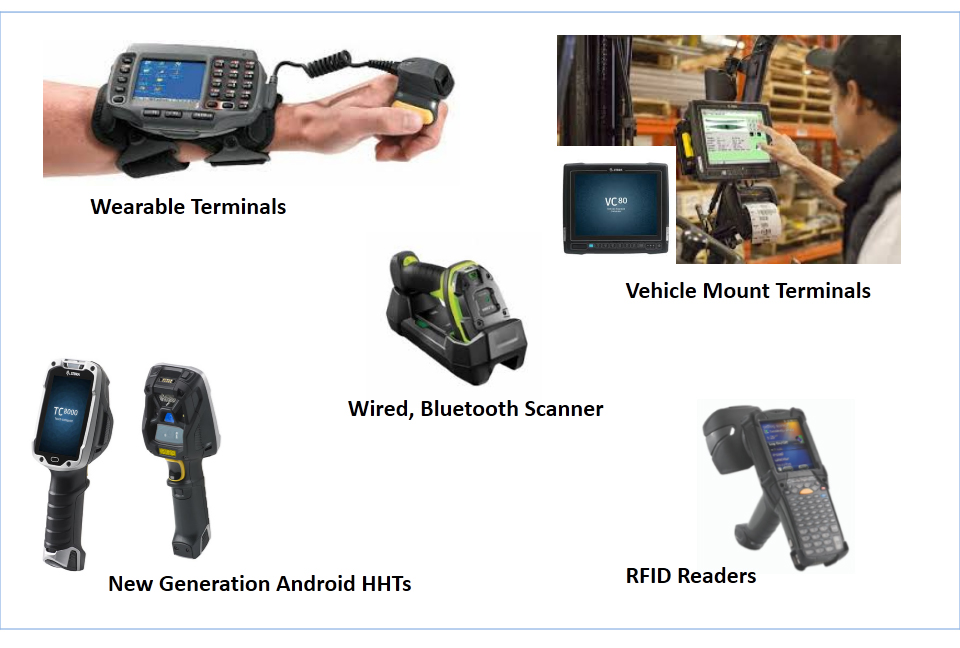
The scan engine should read the labels you really use, whether one-dimensional or two-dimensional codes, at the distance staff work from. Choose a screen that stays readable in bright dock light and works with gloves. A physical keypad suits heavy data entry, while a touch screen suits browsing and photos. Our guide to rugged handhelds, tablets and vehicle computers compares the device types.
Battery life, charging and shift planning
Work out the longest shift and how often the scanner and wireless link are in use. Plan spare batteries or charging cradles at fixed points so a flat device does not stop a picker. Check how easy it is to swap a battery during a shift and whether charge status is visible.
Wireless, management and software fit
A handheld is only useful when it stays connected and runs your warehouse application. Test roaming across the whole floor, including the far corners and the cold room. Ask how devices are enrolled, updated and locked if lost. Read the types of enterprise mobility solutions for the management tools involved, and enterprise mobility in manufacturing and logistics for typical use cases.
Planning rugged handhelds with Suraj Informatics
Suraj Informatics supplies and supports mobility solutions for warehouses, from device selection and a floor trial to setup and ongoing support. Contact us to plan the right devices for your site.
Rugged handheld computers: common questions
Why not use ordinary smartphones?
Ordinary phones are not built for daily drops, dust or scanning. Rugged devices last longer and scan faster on a warehouse floor.
Should I run a trial first?
Yes. Let staff use a few devices for a week on real tasks before ordering in bulk.
Do handhelds need special software?
They run your warehouse or inventory application. Check that the app supports the device and its scanner.
How are lost devices handled?
A device management tool can lock or wipe a lost device and control which apps it can run.
Talk to our mobility team
Tell us about your warehouse tasks and conditions, and we will suggest suitable rugged devices.





