




Weighbridge automation systems do not only speed up weighing. They turn every weighing into data, and that data can become reports that tell managers what is moving through the gate.
Key takeaways
- Each weighing stores vehicle, material, weights, time and party.
- A short list of daily reports is more useful than a long one.
- Several weighbridges can feed one database for head-office views.
- Reports are only trustworthy if the weighbridge is verified and edits are controlled.
What a weighbridge produces besides a weight
Every weighing creates data: vehicle, material, gross and tare weight, time, driver and party. On paper, that data sits in a register nobody reads. In a weighbridge automation system it goes into a database from the first day, ready to be searched and summarised.
Reports a plant manager can use daily
Start with a short list of reports that answer real questions.
| Report | Question it answers |
|---|---|
| Material in and out | How much came in or left, by day and material |
| Party-wise weighments | What each supplier or customer sent |
| Vehicle history | How often a vehicle comes and its past weights |
| Exceptions | Manual edits, repeat weighments and overrides |

From one site to many
Companies with several weighbridges can bring their data to one place. A head office can then compare sites, see unusual patterns and check that the same rules are followed everywhere. Linking to business software is covered in connecting weighbridges to SAP and ERP.
Making reports trustworthy
A report is only as good as the weight behind it. Keep tare values controlled, restrict edits and log every change. Review exception reports weekly, and act on what they show.
Calibration note: a weighbridge used for trade must be verified and stamped, and re-calibrated when required, under Legal Metrology rules. Automation records the weight, but it does not replace this verification.
Planning weighbridge reporting with Suraj Informatics
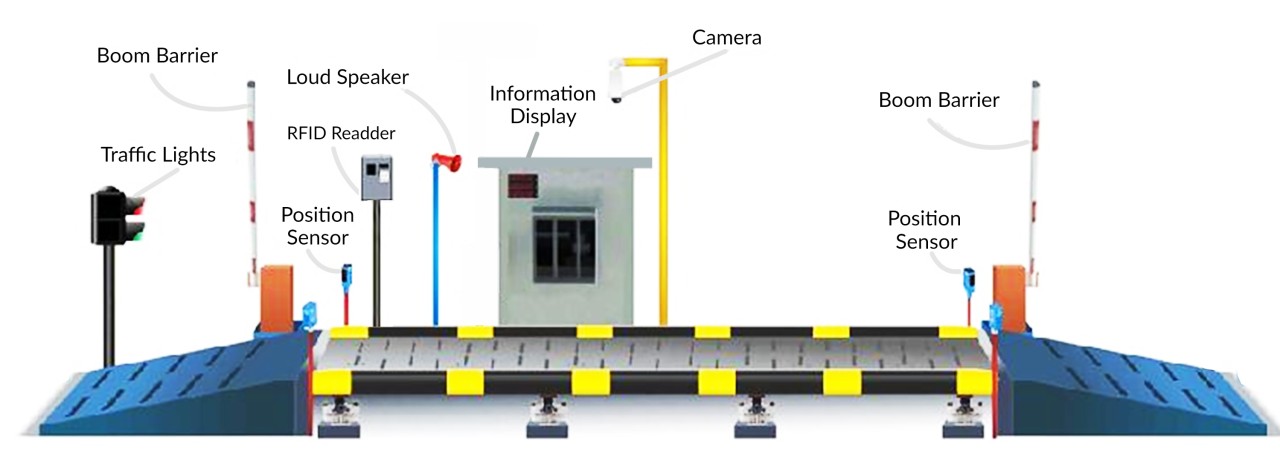
Suraj Informatics provides weighbridge automation systems with cameras, RFID, sensors and software, designed around your site. Contact us to discuss your weighbridge.
Weighbridge reports: common questions
What reports does a weighbridge automation system give?
Typical ones cover material movement, party-wise weights, vehicle history and exceptions. The list can be set to your needs.
Can reports be exported?
Reports can usually be exported to spreadsheet or shared with business software, depending on the set-up.
Can head office see several weighbridges?
Yes, data from several sites can be brought to one database for combined reports.
Do automated reports replace audits?
No. They support audits by showing what was recorded, but verification and checks still apply.
Talk to our weighbridge automation team
Tell us which figures you need from your weighbridge, and we will suggest the right reports.





